
ClimateCruise
DurkesLLCWeather
4.27.00 Reviews
- Version
- 4.5.8
- Installs
- 10.00K
- Age Rating
- Everyone
Screenshots
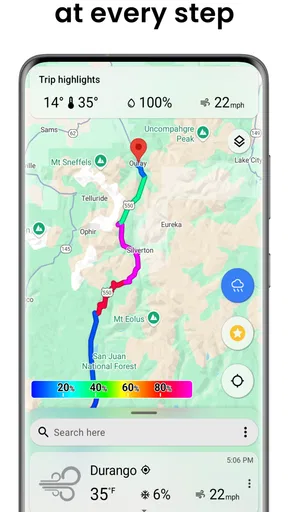
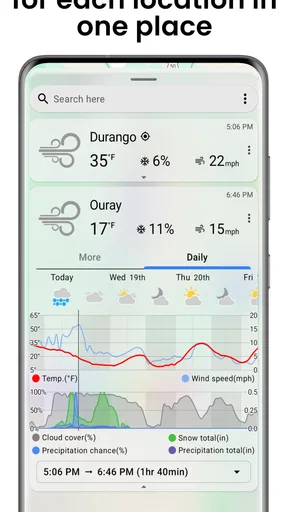
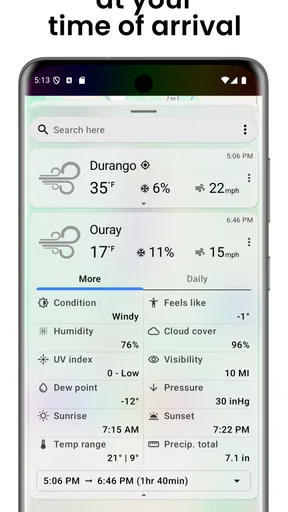
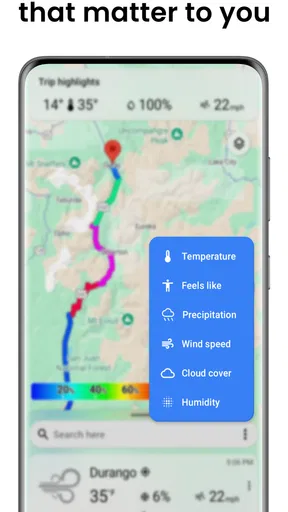
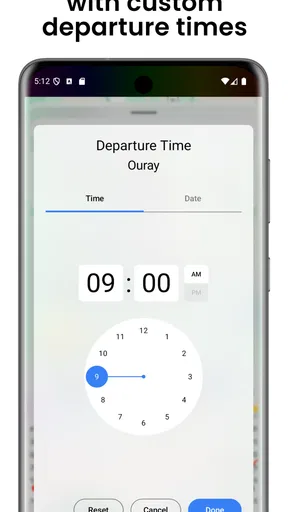
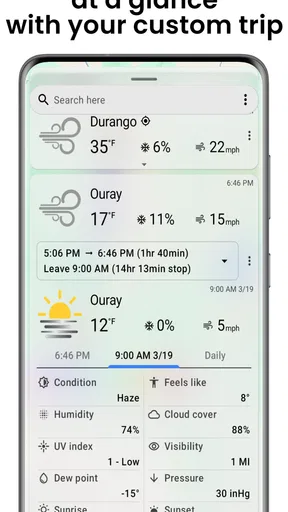
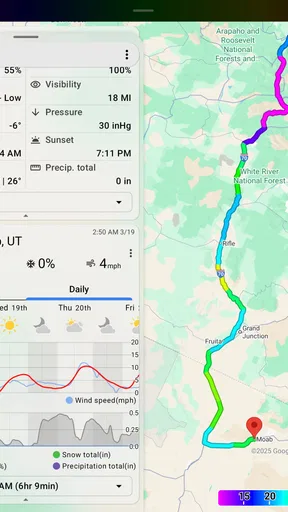
Our Review of ClimateCruise
 Analysis by Appyee
Planning a trip often means checking several places at once: the weather at home, the conditions along the route, and what might be waiting at the destination. ClimateCruise is a weather app from DurkesLLC built around that travel problem. I found its central idea easy to understand: instead of treating weather as something tied to one fixed location, it helps you look at conditions connected to your next journey. That makes it more interesting than a basic app that only shows the forecast for where you are standing.
My first impression is that ClimateCruise is most useful when a trip involves more than one place. A weekend drive, a flight with a change of scenery, a coastal outing, or a visit to relatives can all create the same small headache: opening a normal weather app repeatedly and switching locations manually. This app is aimed at reducing that friction. It is free to install, rated for Everyone, and currently sits at version 4.5.8, so it feels like a maintained product rather than a one-off experiment.
How ClimateCruise fits into everyday travel planning
The app belongs squarely in the weather category, but its appeal is less about replacing every weather tool on a phone and more about arranging travel-related information in one place. I would not describe it as the best choice for somebody who only wants to know whether to carry an umbrella for the next hour. Its stronger use case is comparing the weather that matters to a trip, especially when the departure point and destination may behave very differently.
Imagine leaving early on a cool morning, driving several hours toward a warmer town, and returning late in the evening. A single current-location forecast does not tell the whole story. ClimateCruise makes more sense in that situation because the decision is not simply “What is the weather now?” but “What conditions should I expect across the journey?” That change in perspective is the app’s most useful quality.
I also like that the concept encourages planning before leaving rather than checking conditions only after a problem appears. A traveler can think about clothing, timing, outdoor stops, and whether a backup plan is sensible. The app does not need to be dramatic to be useful; sometimes the value is simply noticing that the destination will be much cooler, wetter, or windier than the starting point.
That said, I would keep a second weather source available for decisions where precision is especially important. ClimateCruise works well as a trip-oriented overview, while a dedicated local forecast service may be preferable for severe-weather alerts, detailed radar work, or highly specialized information. The best way to use it is as a planning companion, not automatically as the only weather authority on your phone.
The current experience and who benefits most
ClimateCruise is a good fit for people who travel often enough to compare locations but do not want a complicated forecasting dashboard. Families can use it before packing for a holiday. Drivers can check whether conditions are likely to change along the way. Someone visiting a different region can avoid relying on assumptions based on the weather outside their own window.
It may also suit users who prefer a focused tool instead of a broad lifestyle app filled with news, videos, advertisements, maps, and unrelated recommendations. The name and purpose point toward a focused travel-weather workflow, and that focus is valuable when the main task is quick preparation. I found the idea easier to appreciate when I treated the app as a pre-trip checklist rather than as a replacement for every weather feature available elsewhere.
People who should probably skip it are users who need a deeply technical meteorological tool. If your routine depends on minute-by-minute precipitation tracking, extensive historical charts, professional aviation details, or a dense set of weather layers, a more specialized service will likely be a better match. ClimateCruise’s travel angle is helpful, but that same focus means it is not trying to be everything to everyone.
There is also a practical question about how much setup a person is willing to tolerate. The app’s value increases when the trip has meaningful locations to compare. For a routine day spent entirely in one neighborhood, opening the phone’s built-in weather panel may be faster. ClimateCruise earns its place when the journey itself is the subject of the forecast.
What the latest version tells existing users
The current release is version 4.5.8. That is useful context for existing users because it indicates that the app has moved beyond its earliest form, but a version number alone should not be mistaken for proof of a particular new feature. I would separate what can be observed today from what a user might hope to see in a future update. The present experience should be judged by whether its travel-centered view makes planning easier, not by assumptions about undocumented changes.
For somebody who already has ClimateCruise installed, the sensible approach is to revisit the app with a real journey in mind. Try it before a trip with different departure and arrival conditions, then compare how quickly it answers your planning questions against the weather app you normally use. This is more revealing than opening it casually on a quiet day, because the app’s purpose becomes clearer when there are several locations and a decision to make.
Existing users should also pay attention to whether the current version fits their personal routine. An update can improve a product without making it essential for every person. If you installed it for occasional travel, the important test is whether it still saves you from switching between multiple location screens. If it does, the app remains useful even if you rarely open it between trips.
The developer is DurkesLLC, and the app has reached more than 10K installs with an average rating of 4.2 from around 33 ratings. Those figures suggest a small but real user base rather than the reach of a major mainstream weather platform. I see that as a reason to approach it with realistic expectations: it has enough presence to be worth trying, but it does not have the broad ecosystem or public track record of the largest names in mobile weather.
The app is free, although in-app items cost $1.00 each. That makes the initial decision easy because you can explore the basic experience without paying upfront. Before spending anything, I would use it on at least one genuine trip and decide whether the additional value is clear in your own workflow. A small purchase can be reasonable when it removes repeated effort, but it should solve a problem you actually have rather than merely unlock something that looks interesting.
How it compares with the usual weather alternatives
The built-in weather app on Android or iOS is usually the fastest option for a single location. It is already on the phone, opens quickly, and is ideal for routine questions. ClimateCruise has a different advantage: it frames weather around movement between places. If your question is “Do I need a jacket right now?” the standard app may win. If your question is “What should I prepare for during this trip?” ClimateCruise has a clearer reason to exist.
Large weather services often offer more breadth. They may include radar, alerts, widgets, hourly breakdowns, maps, air-quality information, and extensive location search. That breadth is useful, but it can also bury the simple travel decision under too many panels. ClimateCruise is more appealing when you want a compact trip view and do not need a full meteorological toolbox.
There is a trade-off here. A specialized travel view can reduce mental effort, but it may not satisfy somebody who wants to inspect every detail of a forecast. I would use ClimateCruise for the first planning pass, then open a more established local service if the forecast looks uncertain or the activity carries real consequences. For an outdoor event, long drive, or weather-sensitive appointment, redundancy is sensible.
Another alternative is simply searching each destination on the web. That works, but it turns a comparison into a series of separate searches. The advantage of a dedicated app is not necessarily that it knows more; it is that the information is organized around the way travelers think. That distinction is easy to overlook, yet it is the most concrete reason to choose this app over a browser tab full of unrelated forecasts.
Useful ways to get more from the app
My first practical tip is to check the route before packing, not just the destination. Travelers often prepare for the place they are going and forget that the departure point, rest stops, or return conditions may be different. A travel-oriented weather view is most valuable when it changes a decision, such as bringing layers, moving an outdoor stop earlier, or keeping a dry alternative available.
A second tip is to use it as a comparison tool before committing to a schedule. If you have flexibility, look at the conditions associated with the planned journey and then consider whether leaving earlier or later would make the day more comfortable. I would not treat the app as a guarantee, but it can help reveal mismatches that are easy to miss when checking only the weather at home.
A third insight is that the app can be useful for packing by activity rather than by destination. A mild destination may still involve a cool early departure, while a warm route can lead to a chilly evening return. Thinking through the entire outing prevents the common mistake of packing for one point in time. This is a small workflow change, but it is where the app’s travel focus becomes more practical than a normal glance at a local forecast.
For family trips, I would check the forecast together before leaving and turn it into a simple plan: what goes in the car, which stop remains flexible, and what activity needs a backup. That is more useful than showing children a long forecast screen. The app can support a conversation about the journey without requiring everyone to understand technical weather terminology.
For regular commuters or people who cross regional boundaries, I would avoid opening it automatically every morning unless the route genuinely changes. Its strength is comparison, not necessarily routine notification. Using it only when conditions or destinations differ can keep it from becoming another app that adds noise to a daily phone-checking habit.
Where the experience still has limits
The first limitation is that a travel overview cannot remove uncertainty from forecasting. Conditions can shift, and a broad trip perspective may not provide enough detail for a narrow local decision. I would still check a more detailed source when planning hiking, boating, outdoor work, or any activity where wind and precipitation timing matter more than a general impression.
The second limitation is the app’s relatively modest reach. With over 10K installs and a 4.2 average, it has not yet become a default choice for the wider weather audience. That does not make it poor, but it does mean I would not assume it has the same depth of integrations, support resources, or mature ecosystem as a long-established competitor. Users who depend on widgets, wearable support, extensive alerts, or highly polished cross-device features should compare carefully before switching.
The small number of user reviews also means personal impressions may vary more than they would with a huge sample. I would treat the rating as encouraging rather than conclusive. The best test is still a real trip, because somebody who travels between locations may find the app far more useful than somebody who rarely leaves one area.
The paid in-app items create another point to consider. Since the app is free to start, the main question is whether the free experience already covers your planning needs. If it does, there is no reason to buy simply because an optional item is available. If an item removes a repeated annoyance, consider the purchase only after you understand exactly how it changes your workflow and whether you will use that improvement more than occasionally.
Compatibility is also worth checking before installation. The app requires iOS or Android version 12 or later, so older devices may not be suitable. For people with a recent phone this is unlikely to be a serious obstacle, but anyone keeping an older handset for travel should verify the operating system first rather than discovering the restriction at the airport or on the road.
What I would watch in future updates
If ClimateCruise continues to evolve, I would most want improvements that strengthen the journey comparison without turning the app into an overcrowded weather portal. Clearer travel planning, faster location handling, and a calm presentation would matter more to me than adding a long list of unrelated data panels. The product’s identity is strongest when it helps answer a travel question quickly.
I would also watch how the developer balances the free experience with the $1.00 in-app items. Optional purchases are easier to accept when the core app remains genuinely useful on its own. If future changes make basic trip planning feel restricted unless users pay, that could weaken the app’s appeal, especially because established weather services already offer many free alternatives.
For current users, the most meaningful sign of progress will be whether each update reduces a real planning step. A new version should ideally make it easier to compare the places that matter, understand the result at a glance, and act on it before leaving. Those are the changes I would notice in daily use; a higher version number by itself is not enough.
ClimateCruise is a focused weather app with a sensible travel problem at its center. I recommend it to people who regularly move between locations and want a quick way to think about the whole outing instead of checking isolated forecasts one by one. I would not recommend replacing every other weather source with it, particularly for severe conditions or technical outdoor planning. But as a free, travel-minded companion from DurkesLLC, ClimateCruise is worth trying when the route matters as much as the destination. Its best quality is not flashy complexity; it is the simple reminder that weather planning should follow the journey, not just the place where you happen to be standing.
Verdict
Strengths of ClimateCruise
- Clear climate data helps users plan routes more comfortably.
- Useful trip insights can encourage more fuel-efficient driving.
- The interface is generally easy to understand for everyday journeys.
- Helpful for comparing how weather may affect different travel plans.
- Can make climate-related travel risks more visible before departure.
Limitations of ClimateCruise
- Accuracy may vary when local weather conditions change quickly.
- Some features may depend on location permissions and mobile connectivity.
- Climate data can be less useful in areas with limited coverage.
- Frequent notifications could become distracting for some users.
- Battery and data usage may increase during continuous trip tracking.
Similar Picks in This Category
View All
Weather - By Xiaomi
Xiaomi Inc.4.1

Weather & Radar Forecast
WetterOnline4.8

Weather
OneLouder Apps4.6

AccuWeather: Weather Radar
AccuWeather3.6

The Weather Channel - Radar
The Weather Channel4.6

1Weather Forecasts & Radar
OneLouder Apps4.3
Frequently Asked Questions
What is ClimateCruise, and what does the app do?
ClimateCruise is designed to help users understand how climate conditions may affect travel and outdoor plans. Depending on the available features and location support, it can present weather or climate-related information in a convenient mobile format. Before downloading, check the current app description, supported regions, data sources, and whether it focuses on live conditions, long-term trends, travel planning, or a combination of these functions.
Does ClimateCruise require an internet connection or location access?
Most climate, weather, mapping, and travel-related applications need an internet connection to retrieve updated information, although some previously loaded content may remain available offline. ClimateCruise may also request location permission to provide information relevant to your area or route. You can usually deny access or enter a location manually, but doing so may limit personalization. Review the permission requests carefully before accepting them.
Is ClimateCruise free to download, and are there in-app purchases?
The app may be available as a free download, but users should not assume that every feature is included at no cost. Some applications in this category use subscriptions, paid upgrades, advertising, or optional purchases for advanced forecasts, detailed reports, additional destinations, or an ad-free experience. Check the Google Play Store or Apple App Store listing for the latest pricing, trial terms, renewal conditions, and cancellation instructions.
How accurate and reliable is the information provided by ClimateCruise?
The usefulness of ClimateCruise depends on the quality, update frequency, and geographic coverage of its underlying data sources. Weather and climate information can change quickly, while long-term projections are estimates rather than guarantees. Treat the app as a planning aid instead of an official emergency or safety service. For storms, dangerous conditions, travel restrictions, or health-related decisions, confirm details with local authorities and trusted official sources.
Which devices and operating systems are compatible with ClimateCruise?
Compatibility depends on the version released by the developer and the requirements listed in the relevant app store. Before installing ClimateCruise, verify whether your Android or iOS version is supported, how much storage the app needs, and whether particular features require GPS, notifications, background activity, or newer hardware. Tablets, older phones, and devices with restricted location or notification permissions may not provide the complete experience.
